Email Reports
Email reports deliver a summary of your website’s analytics directly to your inbox on a recurring schedule. Get a snapshot of key metrics, top-performing pages, and traffic sources without having to log in to the dashboard.
Email reports are available on Professional and Enterprise plans.
Setting Up Email Reports
Navigate to Dashboard > Settings > Reports to configure your email reports.
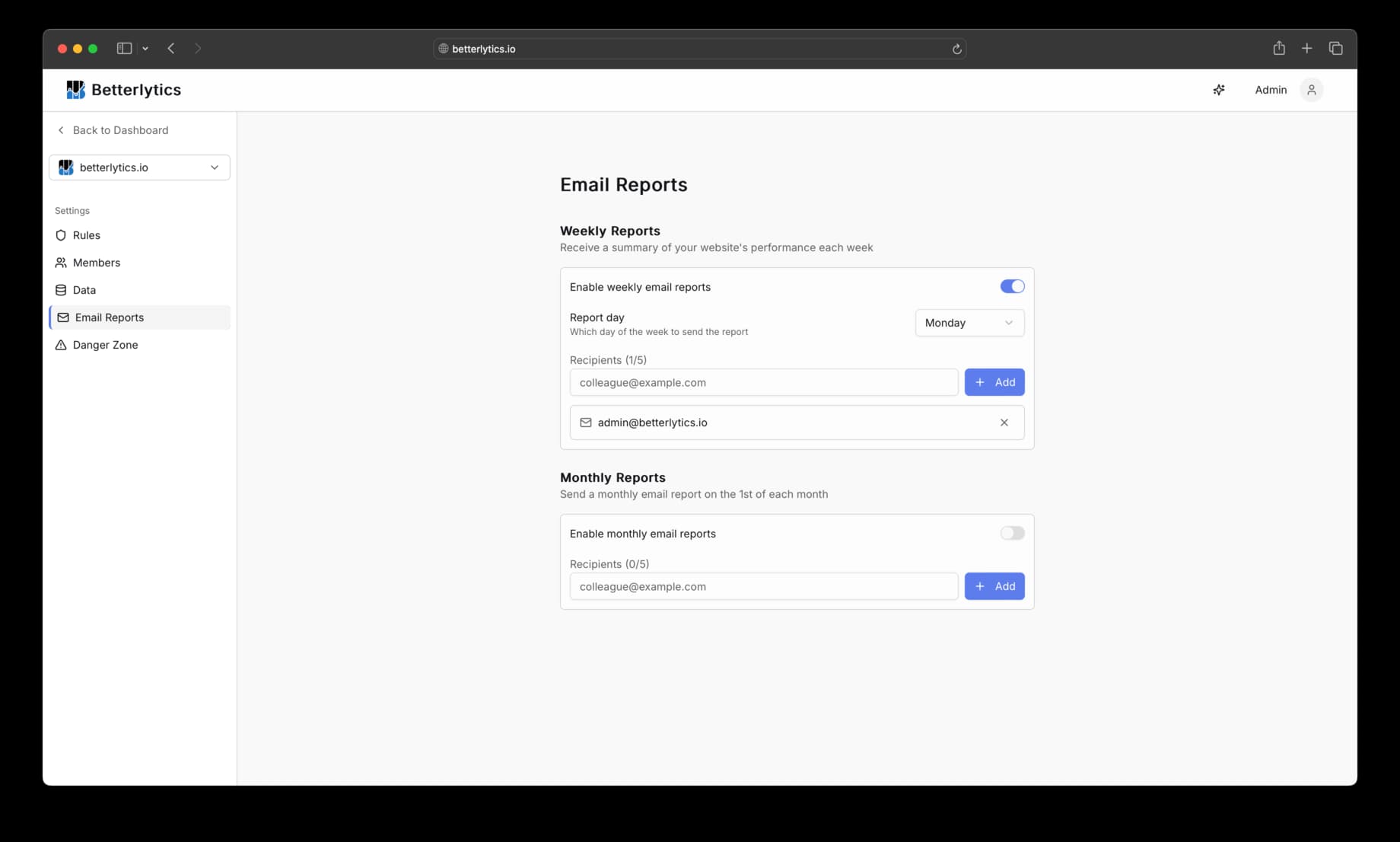
You can set up two types of reports independently:
Weekly Reports
- Toggle: Enable or disable weekly report delivery
- Report day: Choose which day of the week to receive the report (Monday through Sunday)
- Recipients: Add up to 5 email addresses
Weekly reports cover the previous 7 days of analytics data and include comparisons to the 7 days before that, so you can quickly spot trends.
Monthly Reports
- Toggle: Enable or disable monthly report delivery
- Recipients: Add up to 5 email addresses
Monthly reports are sent on the 1st of each month and cover the entire previous month, with comparisons to the month before that.
Managing Recipients
Each report type has its own recipient list. You can add up to 5 email addresses per report type.
To add a recipient, type an email address into the input field and press Enter or click Add. To remove a recipient, click the remove button next to their address.
What’s Included in the Report
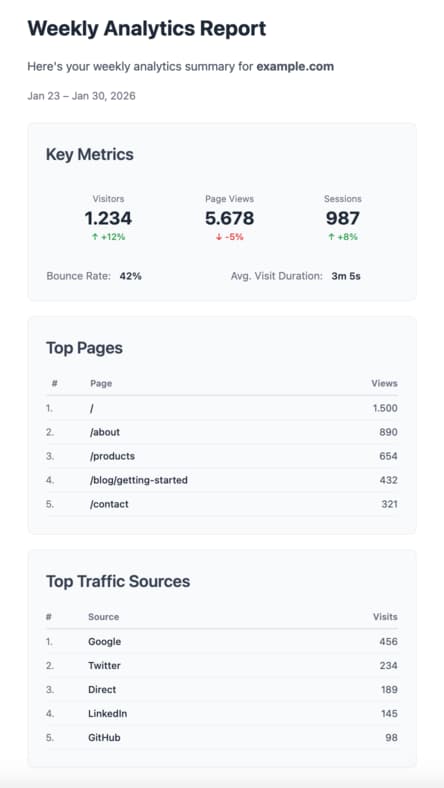
Each email report contains:
Key Metrics
- Visitors: unique visitor count with percentage change from the previous period
- Page Views: total page views with trend indicator
- Sessions: session count with trend indicator
- Bounce Rate: percentage of single-page sessions
- Average Visit Duration: how long visitors spent on your site
Trend indicators show whether each metric went up, down, or stayed the same compared to the previous period.
Top Pages
A ranked list of up to 10 pages with the most page views during the reporting period.
Top Traffic Sources
A ranked list of up to 10 referral sources driving the most visits, such as Google, social platforms, or direct traffic.
When Reports Are Sent
Reports are sent at 8:00 AM UTC on the scheduled day:
- Weekly: On your chosen day of the week
- Monthly: On the 1st of each month
Reports are based on UTC time. Depending on your time zone, you may receive the email on a slightly different calendar day.
Permissions
Only dashboard members with the Owner or Admin role can configure email report settings. See your dashboard’s member settings to manage roles.
Troubleshooting
Not receiving reports
- Verify that reports are enabled in Settings > Reports
- Check that your email address is listed as a recipient
- Look in your spam or junk folder
- Ensure your plan includes email reports (Professional or Enterprise)
Report data looks empty
- Reports require analytics data from the reporting period: if your site had no traffic during the reporting period, the report will reflect that
- Confirm your tracking script is installed and collecting data
Questions about email reports? Join our Discord community for help!