A visitor count has to answer one question for every pageview: have we seen this person before? Most analytics tools answer it with a cookie. The first visit stores a random ID in the browser, every later visit reads it back, and the tool counts people by that ID for as long as the cookie lives.
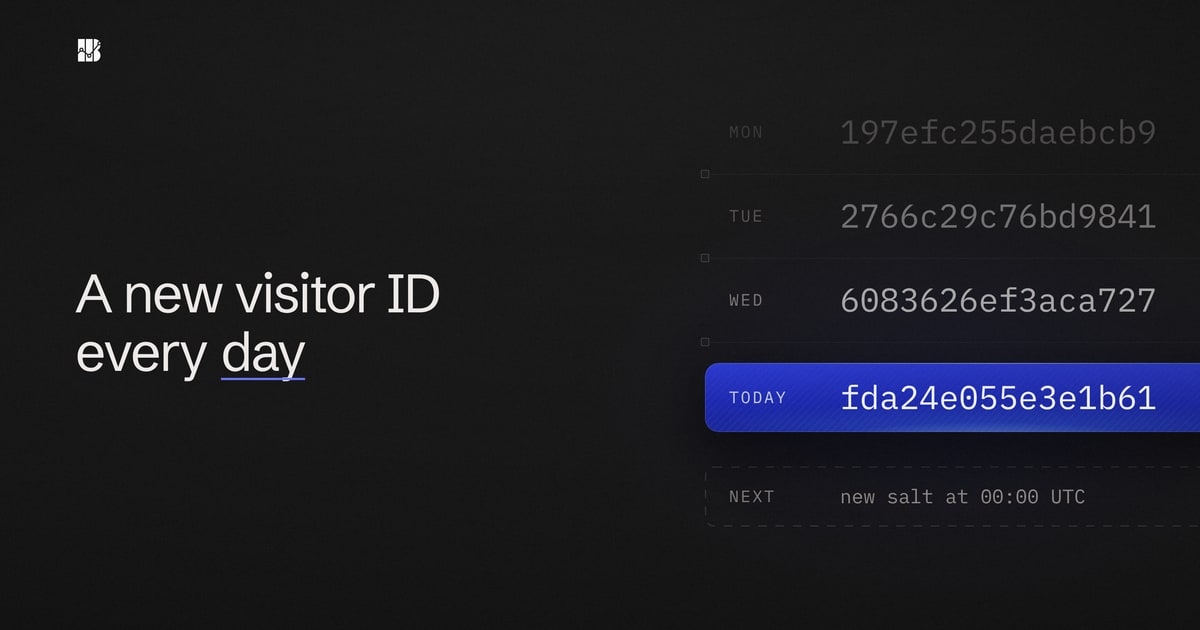
Betterlytics answers the question on the server, and only for one day at a time. The backend turns each request into a salted hash of a few coarse details, then replaces the salt every day and deletes the old ones. This post walks through the code that does it, what ends up in our database, and the cases where the count comes out wrong. All of it is open source, and the files are linked at the end so you can check each claim.
In short
- The tracking script sets no cookies and stores nothing in the browser for analytics.
- The visitor ID is a SHA-256 hash of a daily random salt, the network part of the IP address, a screen size class, the browser and its major version, the operating system and the site's domain.
- Each salt is deleted after at most two days. After that, nobody can work out what went into the IDs made with it, us included.
- The IP address is never written to the database.
- The same person counts as a new visitor every day, and people on one network with identical setups can count as one.
What the tracking script sends
Each pageview is one POST from the tracking script to our /event endpoint. The body holds the site ID, the event name, the page URL, the referrer, the browser's user-agent string, the screen size and a timestamp. Like every HTTP request, it also arrives with the visitor's IP address.
The script never reads or writes document.cookie, and for analytics it stores nothing in the browser at all.
How a request becomes a visitor ID
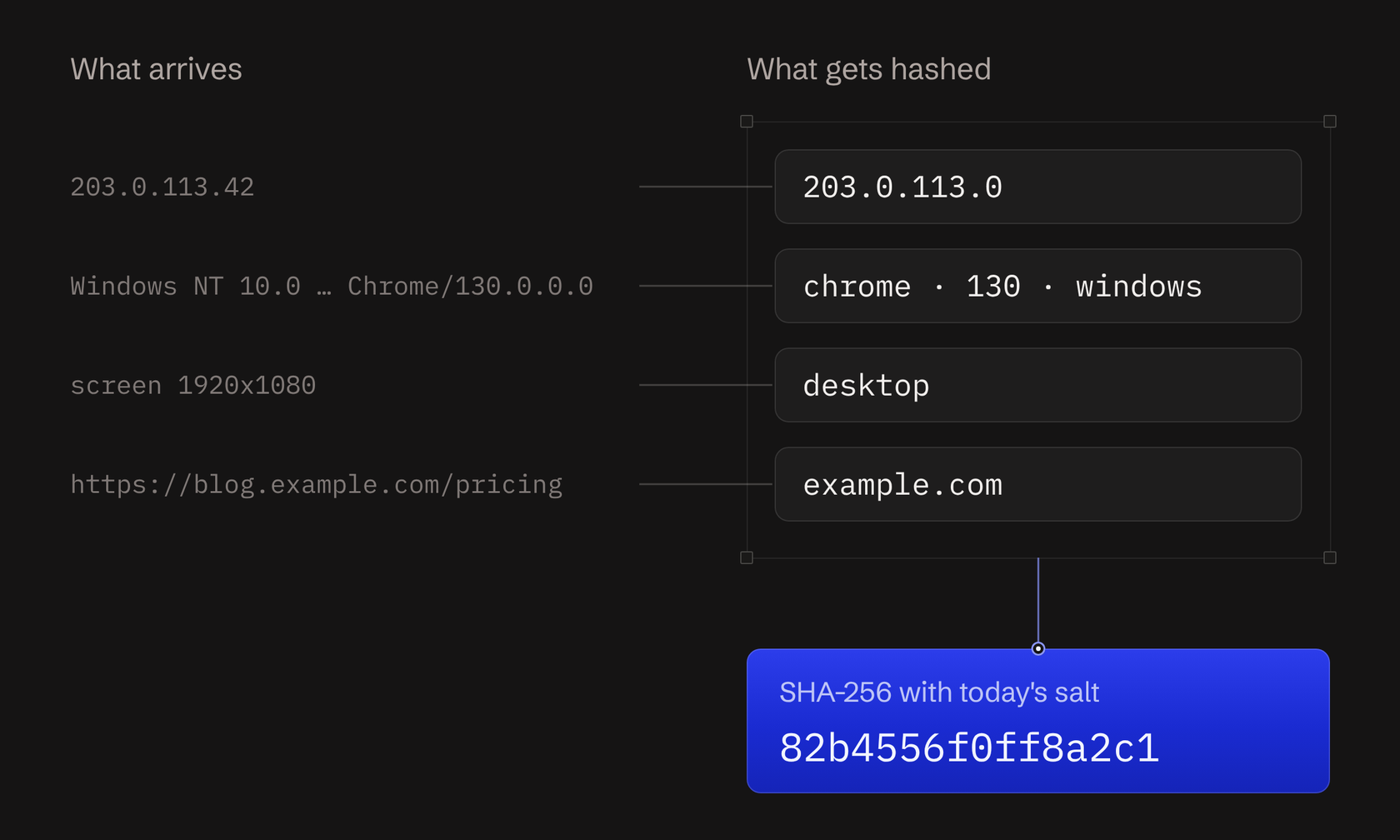
Before anything is stored, the Rust backend takes four values from the request: the IP address, the user agent, the screen size and the site's domain. It cuts each one down to a coarse version, then hashes those together with a daily salt.
| Input | What goes into the hash |
|---|---|
| IP address | The network part only. 203.0.113.42 goes in as 203.0.113.0, and an IPv6 address keeps only its first four groups |
| Screen size | One of four classes, mobile, tablet, laptop or desktop, split at 576, 992 and 1440 pixels wide. A 1920x1080 screen goes in as desktop |
| Browser | Family and major version only. Safari 18.1 goes in as safari and 18 |
| Operating system | Family only, such as windows or ios, with no version |
| Domain | The site's registrable domain, so blog.example.com and example.com are the same |
| Salt | 16 random bytes that change every day |
Each cut removes the part that comes closest to singling out one connection or device: the end of the IP address, the exact screen resolution and the minor version number. What's left is shared more widely. An IPv4 network part alone covers up to 256 addresses.
The cuts don't make a visitor anonymous on their own, though. An IPv6 network part usually belongs to one home or one phone connection, and a small office may have only a few people on the same setup. That's why the daily salt in the next section matters as much as the cuts. The hash itself is a few lines in fingerprint.rs:
let mut hasher = Sha256::new();
hasher.update(salt.as_slice());
hasher.update(format!(
    "{}:{}:{}:{}:{}:{}",
    anonymized_ip, device_category, browser_family,
    browser_major_version, os_family, domain
));

let result = hasher.finalize();
u64::from_be_bytes(result[..8].try_into().expect("always produces 32 bytes"))
The first 8 bytes of the SHA-256 digest become a 64-bit number, and that number is the visitor ID stored with each event. Two pageviews with the same inputs on the same day get the same ID. If any input changes, the salt included, the ID changes completely.
Cutting the hash to 64 bits adds almost no errors of its own. Even with a million different sets of inputs in one day, the chance that any two of them end up with the same number is about 1 in 37 million. When two people share an ID, it's because their cut-down inputs were identical. The section on counting errors below covers when that happens.
The domain is in the hash to prevent cross-site tracking. Every site on Betterlytics shares the same daily salt, and all their events are stored together. Without the domain, one person reading two unrelated sites on the same day would get the same ID on both. Anyone with access to the data, us included, could then follow that person from one site to the other by matching IDs. With the domain, the two IDs have nothing in common.
A new salt every day
The salt is what stops the hash from being a permanent label. Without one, the same six values would give the same ID forever, and anyone who knew a visitor's network and browser could compute it.
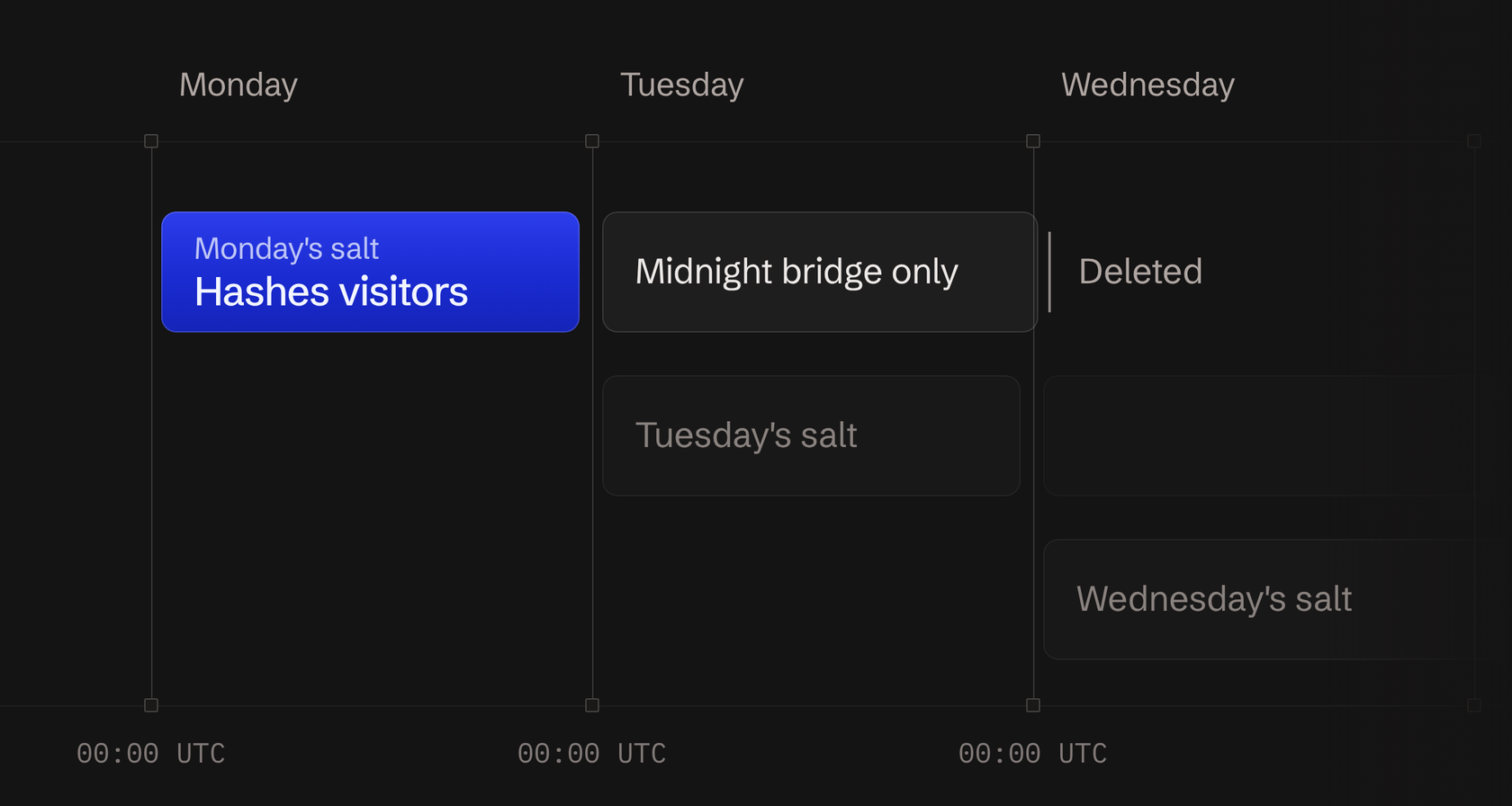
The salt service in salt/mod.rs keeps one salt per UTC day. Each one is 16 bytes from the operating system's random number generator, stored in a Postgres table called AnalyticsSalt. The backend also holds today's and yesterday's salt in memory, so hashing an event never waits on the database.
Rotation is lazy. The first event after midnight UTC starts a background task that inserts a salt for the new day and deletes every salt older than yesterday:
// Keep only today + yesterday; anything older is deleted
// so old fingerprints become irreversible.
let cutoff = today.pred_opt().unwrap_or(today);
conn.execute(
    r#"DELETE FROM "AnalyticsSalt" WHERE "saltDate" < $1"#,
    &[&cutoff],
)
.await?;
A salt therefore exists from the first event of its day until the first event two days later, which is at most about 48 hours. Then it is gone from memory and from the database.
Why deleting the salt matters
The salt works like a key to one day's IDs. With it, an ID can be traced back to a network by guessing. Without it, guessing gets nowhere.
While a salt exists, the guessing is simple. The browser, OS, device type and domain are stored next to the visitor ID, so the only unknown input is the network part of the IP address. For IPv4 that is 2^24 possibilities, about 16.7 million, which an ordinary computer can try one by one. Someone holding both the salt and the event data could work out which network an ID came from. They would learn the network and nothing finer, because the full address never went into the hash.
Deleting the salt ends that. Anyone trying to reverse an ID would then have to guess the 16-byte salt as well, one of 2^128 possibilities, which is far more than any computer can search. That holds for us and for anyone who copies the database later. The IDs also can't be linked to the same visitor's IDs on other days or other sites, because the salt that would connect them no longer exists.
Sessions and midnight
A session is a run of events from one visitor with no gap longer than 30 minutes. The backend keeps active sessions in memory, looked up by site and visitor ID, and gives each new session a random 64-bit ID. The session ID is drawn at random, so it says nothing about the visitor.
Midnight needs one extra step. A visitor reading an article at 23:58 UTC gets a new visitor ID once the salt rotates after midnight. To keep the visit in one piece, the backend also computes the ID that visitor would have had with yesterday's salt and checks it when today's ID has no session. That lookup is the only thing yesterday's salt is used for.
Without that step, the visit would split into two sessions at midnight. The first would end early, and the second would start halfway through the visit, on a page the visitor didn't arrive on. Session counts, visit duration, bounce rate and entry pages would all be off. Only the session carries over, though. The visitor ID still changes at midnight.
What we store, and what we never store
Each event becomes one row in ClickHouse. Apart from the event itself (page path, referrer, campaign parameters, custom event data), the row holds the visitor ID, the session ID, the device type, the browser and its version, the OS and its version, and the network operator's ASN number and name. The row also gets a country, region and city from a lookup in a MaxMind database on our own servers.
The backend shortens the IP address before every lookup, and the row has no column for it, so neither the full address nor the shortened one is stored. For tracked events, the full address stays in memory only while the request is handled.
| Stored with each event | Never stored |
|---|---|
| Visitor ID (the daily hash) and session ID | The IP address, full or shortened |
| Device type, browser and version, OS and version | Any salt older than yesterday |
| Network operator and location | An ID in the visitor's browser |
Requests that trip one of our bot checks also go to a separate table, which we use to tune the filters. Some checks only observe until we trust them, so this table can hold real visitors' requests too. Each row keeps the page, the referrer, the full user agent, the screen resolution and the network operator, but no IP address or visitor ID.
Where the counts are wrong
A daily hash has known errors. They are the price of not keeping an ID, and you should know them before you compare our numbers with another tool's.
A returning visitor is new every day. Someone who reads your blog on Monday and again on Tuesday is two visitors. The dashboard counts distinct visitor IDs over the date range you pick, so a 30-day visitor number is roughly the sum of the daily numbers, which is higher than the number of people. For the same reason, Betterlytics can't tell you how many visitors came back, or build retention cohorts.
Days start at midnight UTC. The salt follows UTC, not your site's time zone. For a site in New York, the visitor day turns over at 7 or 8 in the evening local time, depending on daylight saving.
A visit across midnight counts twice. The midnight step keeps it as one session, but its events after midnight carry the new day's visitor ID. A date range that covers both days therefore counts that person twice.
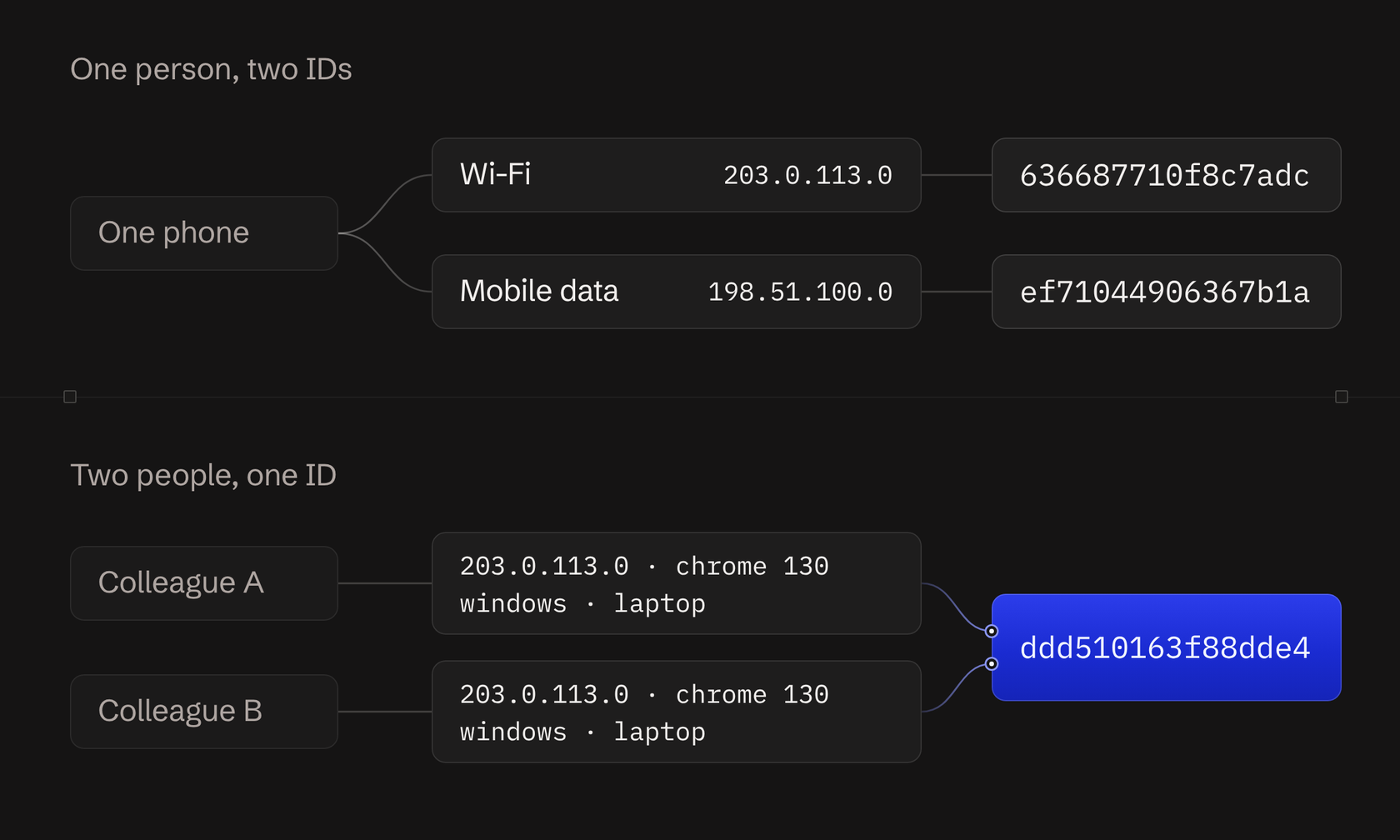
One person can become two. If anything that goes into the hash changes during the day, the visitor gets a new ID and a new session. A phone that moves from Wi-Fi to mobile data gets a new network address. A browser that updates to a new major version changes the version. Minor updates, like Safari 18.1 to 18.2, don't affect the ID. Moving the browser to a screen in a different size class can change the device type.
Several people can become one. Visitors on the same network (the same first three blocks of an IPv4 address) with the same device type, browser version and OS get the same ID. Offices, schools and mobile carriers that put many customers behind shared addresses all cause this. Sessions are looked up by visitor ID, so those people also share a session, and two colleagues reading your site at the same time look like one visit with twice the pageviews.
Taken together, the visitor count tells you roughly how many people came each day. It can't follow one person over time, so use it to compare days, pages and sources.
How this compares with cookies and fingerprinting
A cookie ID is a random value stored in the browser on the first visit. It recognizes one browser for as long as the cookie lasts; Google Analytics' _ga cookie, for example, lasts two years by default. That long memory is what makes returning-visitor and retention reports possible. It also means writing to the visitor's device, which in the EU falls under the ePrivacy rules on device storage, and it is why most cookie-based setups sit behind a consent banner. Visitors who decline usually go uncounted.
Persistent fingerprinting builds a stable ID from many browser details, such as canvas rendering, installed fonts, audio hardware and time zone. It needs no storage and survives cleared cookies, which makes it a tracking technique by design. European regulators said in a 2014 opinion on device fingerprinting that it can fall under the same consent rules as cookies.
| Cookie ID | Persistent fingerprint | Betterlytics daily hash | |
|---|---|---|---|
| Where the ID lives | In the browser | Recomputed from browser details | On the server only |
| How long it recognizes someone | As long as the cookie lasts | Until those details change | One UTC day |
| Returning visitors and retention | Yes | Yes | No |
| Same ID across different sites | Possible with third-party cookies | Yes | No, the domain is in the hash |
The daily hash gives up everything that needs memory across days. In return, once a salt is deleted, the IDs made with it can't be tied to a network, a person or any other day.
Betterlytics isn't the only tool that counts without cookies. Our comparison of European Google Analytics alternatives shows which tools set cookies and where each one stores its data.
What this means for consent
Cookie banners exist because EU rules require consent before a site stores or reads information on a visitor's device. For analytics, error tracking and Core Web Vitals, the Betterlytics tracker stores nothing there, which takes away the usual reason for a banner. On top of that, the IP address is used in memory and never stored, and visitor IDs can't be linked across days or sites.
A few things can still call for consent. Session replay records the page, so it only runs once your site records consent. Custom events and global properties carry whatever data you choose to send. Other tools on your site may need consent of their own. And the EU regulators' 2024 guidelines on the device rule read it broadly enough that it can cover the user agent and screen size the script reads. Under the GDPR, an IP address usually counts as personal data even when it is only processed for a moment, so the processing still needs a legal basis, which for cookieless analytics is often legitimate interest.
We are not lawyers, and this post is not legal advice. When you document your setup, show this post and the code it links to your data protection officer.
Read the code yourself
Everything above comes from these files in the Betterlytics repository:
static/analytics.jsis the tracking script.backend/src/analytics/fingerprint.rsbuilds the hash.backend/src/ip_parser/mod.rsshortens the IP address inanonymize_ip.backend/src/salt/mod.rscreates, rotates and deletes the daily salts.backend/src/visitor/mod.rsandbackend/src/session/mod.rsassign visitor IDs and sessions, including the midnight bridge.backend/src/db/models.rsdefines the event row written to ClickHouse.
The excerpts show the code as of November 2026; the links go to the current version. If you find a place where the code and this post disagree, open an issue and we will fix whichever one is wrong.
To see the counts on a real site, the live demo is open, and you can start a free account whenever you want to try it on yours.